
Daily Closing Procedures, Front Desk Protocols & Clinical Workflow Guidance
Applies to: All Administrative and Front Desk Staff
Purpose: To ensure operational safety, patient privacy, accurate billing, and compliant clinical workflow.
1️⃣ End-of-Day Item Storage
All MCMC staff must store the following items before leaving the practice:
- Cash
- Mobile phones
Items must be placed in the white cabinet located in the admin room prior to closing.
2️⃣ Lighting Shutdown Procedure
Before leaving, staff must switch off lights at the following locations:
- Front reception wall: 4 switches
- Wall next to sliding door: 1 switch
- Pharmacy open area wall: 1 switch
⚠️ Room lights are automatic and do not require manual shutdown.
3️⃣ Door Locking Checklist
Staff must complete the following checks in order before leaving the premises:
- ✅ Confirm the fire exit door next to the dispatch room is closed
- ✅ Close the sliding door
- ✅ Walk through the corridor toward the toilets and confirm the 4Cyte door opposite the toilets is locked
4️⃣ Vaccine Receiving & Transfer Procedure
If vaccines are delivered to 1253:
- Immediately place vaccines into the refrigerator.
- Notify MCMC staff immediately for collection.
⚠️ Before transferring vaccines, confirm the location of the vaccine esky, as it may be located at either MCMC or 1253.
5️⃣ Chillbot Vending Machine User Guide
Usage Steps
Step 1 — Card Unlock
- Tap bank card or mobile payment device on the sensor.
- A temporary $50 pre-authorisation will be charged.
- A clicking sound indicates the door has unlocked.
Step 2 — Select Items
- Open the door and choose drinks or snacks.
Step 3 — Close the Door
- Ensure the door is fully closed after selection.
Step 4 — Payment Settlement
- The system charges based on items taken.
- Any remaining balance is automatically refunded to the original payment method.
Important Notes
- If payment succeeds but the door does not open, the $50 hold will automatically be refunded within 1 hour.
- For machine issues, contact Chillbot Support:
1300 813 481
(phone number displayed on the screen)
🚨 Important Administrative Reminders
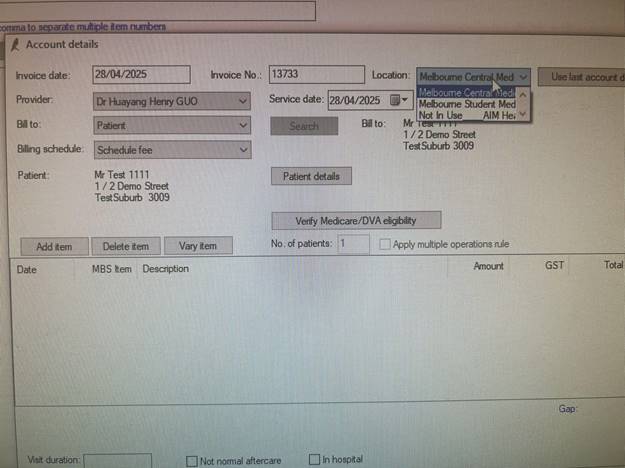
6️⃣ Correct Location Selection (Best Practice)
- Always select the correct Location when logging into Best Practice.
- Before finalising billing, confirm the Location field is accurate.
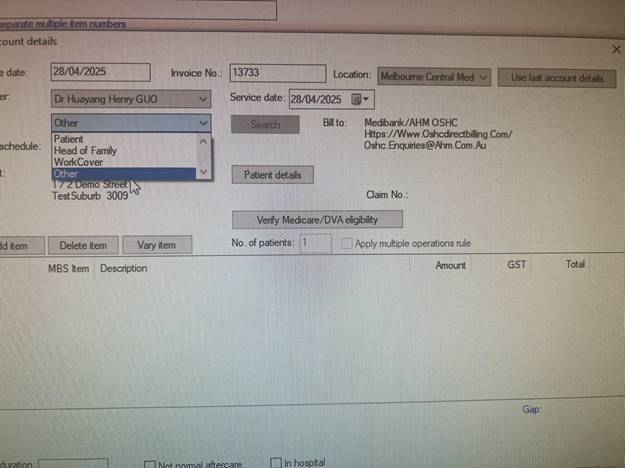
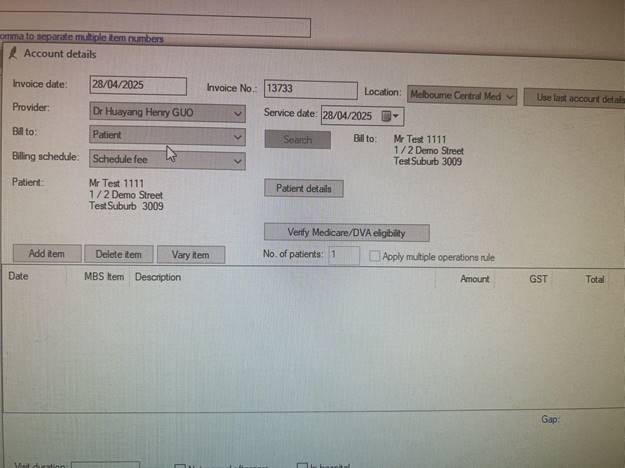
7️⃣ Billing Responsibility (“Bill To”)
When patients pay privately (e.g., TOP fee, vaccines, consumables):
✅ Select “Bill To: Patient”
❌ Do NOT select “Others”.
Staff must verify this before saving billing entries.
📢 Front Desk Clinical Boundary Policy
Front desk staff must not promise or imply any medical outcome.
Key Principles
- Administrative staff arrange appointments — they do not provide medical advice.
- Only doctors determine:
- Prescriptions
- Medical certificates
- Investigations
- Reports or referrals
Even common medications may not be prescribed depending on clinical judgement.
Restricted Medications Policy
The practice does not prescribe:
- Stimulant medications
- Sleeping tablets
- Valium / Endone / Morphine / Benzodiazepines
- Hormonal medications (e.g., testosterone)
If patients enquire:
- Direct them to the clinic policy poster.
- Inform them prescriptions cannot be guaranteed.
- Advise consultation is required for all medical decisions.
Standard Response (Mandatory)
“This will need to be assessed by the doctor during consultation before any decision can be made.”
Patient Expectation Principle
Patients book a consultation, not a guaranteed outcome.
A consultation remains valid even if medication or certificates are not issued.
🫀 ECG Workflow (MCMC & 1253)
Performed by 4Cyte Pathology Collector
When a Doctor Requests an ECG
- Doctor provides a 4Cyte ECG request form.
- Front desk must:
- Add patient to Pathology column
- Select appointment type: ECG
- Set status to Blue (In Progress)
After ECG Completion
- Patient must remain seated until doctor reviews results.
- 4Cyte collector provides a red ECG printout.
- Staff must:
- Scan and upload ECG tracing immediately
- Scan ECG waveform only (patient identifiers not required in scan)
- Update Pathology status to Complete
⚠️ Patients must NOT leave before doctor review due to potential cardiac risk.
🩸 Pathology Follow-Up Appointment Protocol
After pathology collection (e.g., blood tests):
Front desk must proactively ask patients whether they wish to book a results review appointment.
Patient Information to Provide
- Standard blood results: approximately 3–5 business days
- Follow collector’s advised timeframe for specialised tests.
When booking:
- Use the estimated result timeframe.
- Inform patients of potential fees (management fees, private gap payments, etc.).
If Patient Asks to Wait Until Results Are Ready
Staff should explain:
- Front desk cannot access or verify results.
- Appointments are scheduled based on estimated timing only.
- Later appointments may be arranged but result readiness cannot be guaranteed.
SMS Notification Enquiries
Explain that:
Vaccination reminders may also be sent via recall system.
SMS notifications are not guaranteed.
Urgent or abnormal results will always trigger contact by the practice.
Doctors may recall patients via the recall system when review is required.
 English
  Chinese