
Search
-
IT Support
-
Administration
-
Nurse
-
Doctor
-
Common Q&A
- 25/2/2026 News Updating
- How to manager Bupa Medical Certificate
- Common Q&A
- 12/2/2026 News Update
- 6/2/2026 News Update
- 5/2/2026 News Update(under development)
- Practice Operational Notice
- 26/2/2026 Incident Learning Case_Unplanned Doctor Change
- 26/2/2026 Incident Learning Case_Breach of Patient Privacy
- 26/2/2026 Incident Learning Case_Incoming Hospital Document Filed Without Action
- 26/2/2026 Incident Learning Case_Front Desk Provided Medication Assurance
- 26/2/2026 Recording Payments in Appointment Book
- How to merge scanned pages into one PDF document?
- What’s Medicare, what’s concession, what’s Pension card, what’s Health Care Card?
- What if I need to give a task to doctor? Think before handover(under development)
- Why do we need IHI?
- How to access the Best Practice learning materials?
- Patient looking for serology tests for placement?
- Show Remaining Articles (3) Collapse Articles
-
Clinical Resources
-
- Telephone Policy
- Spill Management Protocol
- Social Media Policy 2025
- Second Opinion and Alternative Clinical Advice Policy
- Records Management Policy
- Private and Health Information Policy 2025
- Personally Controlled Electronic Health Record Policy
- My Health Record Policy
- Medical Emergency Policy
- AIMHealth Medlbourne Central Medical Centre Policy and Procedure Manual 2025
- Infection Control Policy
- Home and Other Visits
- Follow up of Test Policy
- Ethics and Values
- Ethical Dilemmas Policy
- Email Use Policy 2025
- Cultural Safety Policy
- Complaints Management Policy
- Cold Chain and Vaccine Management Policy and Procedure Manual 2025
- Ceasing Patient Care Policy
- Blood and Body-Substance Exposure Protocol
- Anti-discrimination Policy
- Management of High-risk Results Outside of Normal Opening Hours Policy
- After-hours Service
- How to Check “Doctor attention required” list on Health Engine
- Medical Record Request Policy and Procedure
- Show Remaining Articles (11) Collapse Articles
-
-
Clinic Overview
-
Templates & Forms
-
- General Consent Form
- MyMedicare Registration Form
- Refusal of Treatment against Medical Advice
- Skin Lesion Removal Consent Form
- Shave Biopsy Consent Form
- Punch Biopsy Consent Form
- Presence of a Third Party Patient Consent Form
- IUD Removal Consent Form
- IUD Insertion Consent Form
- Iron Infusion Consent Form
- Implanon Removal Consent Form
- Implanon Insertion Consent Form
- Cryotherapy Consent Form
- Implanon Insertion Consent
-
< All Topics
Print
Posted
Updated
Byadmindoncaster
Step 0: Contact IT to get VPN and Windows account info. The VPN config file is also sent via email.
Step 1: Download VPN software( Windows or iOS) via https://www.draytek.com/products/smart-vpn-client/
Step 2: Import VPN profile
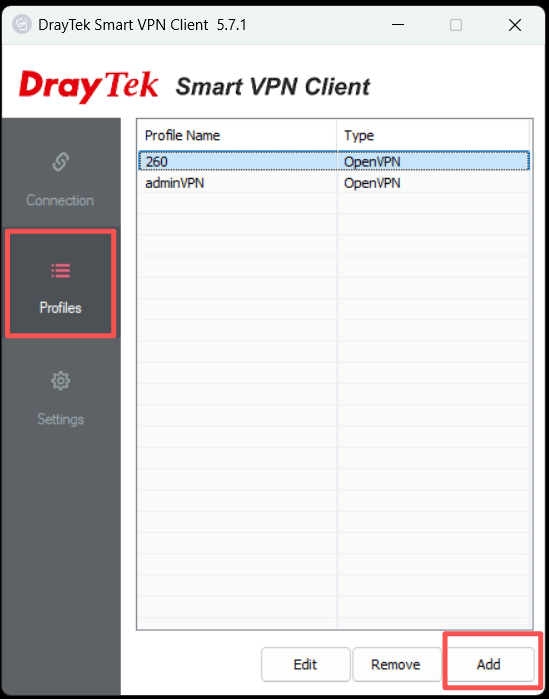
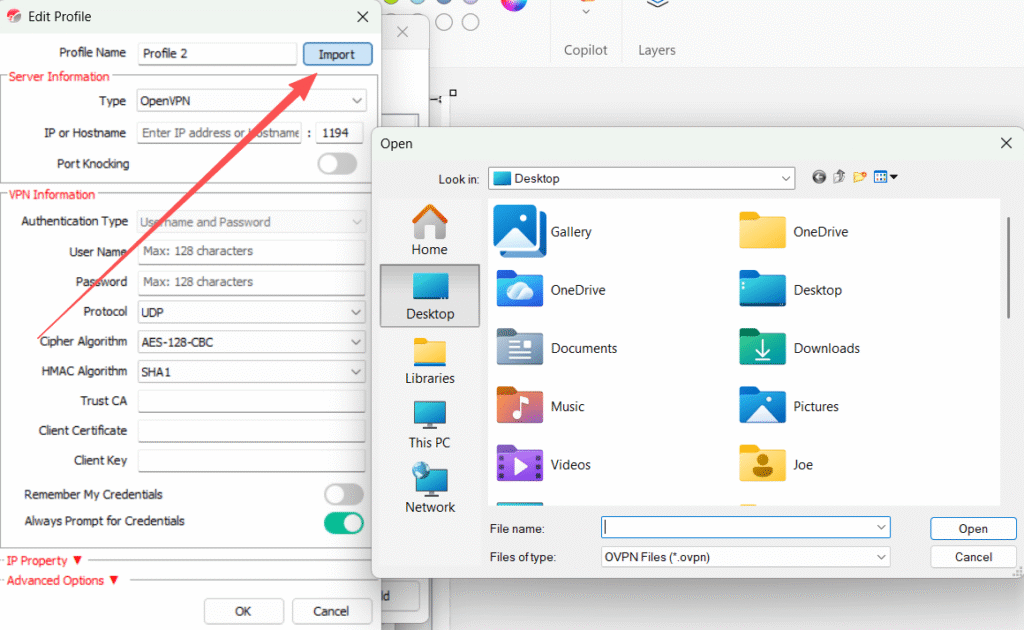
Step 3: Choose the proper connection type–Open VPN

Step 4: Import the .opvn file from the email attachment. Or download via link below and rename it as 260_vpn.ovpn
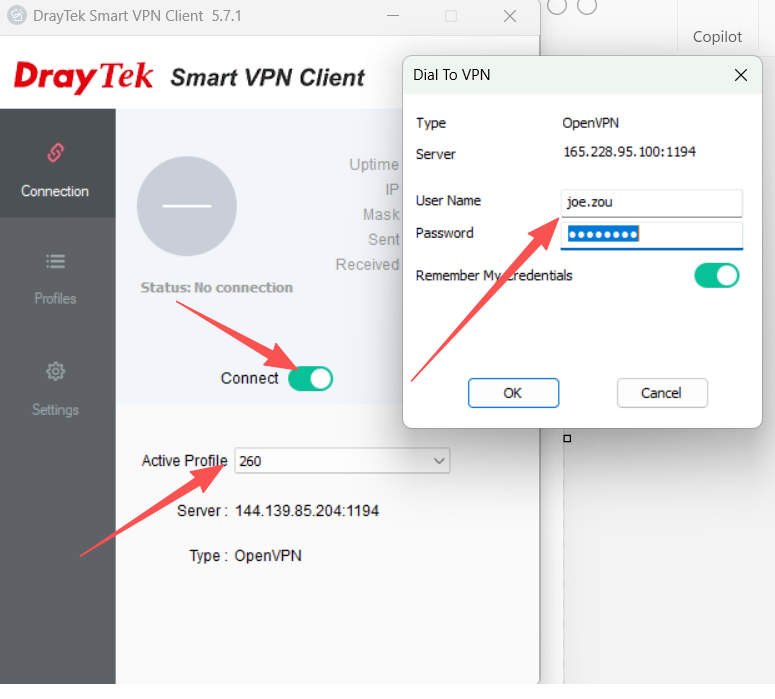
Step 5: Choose the profile and activate VPN connection with account info.
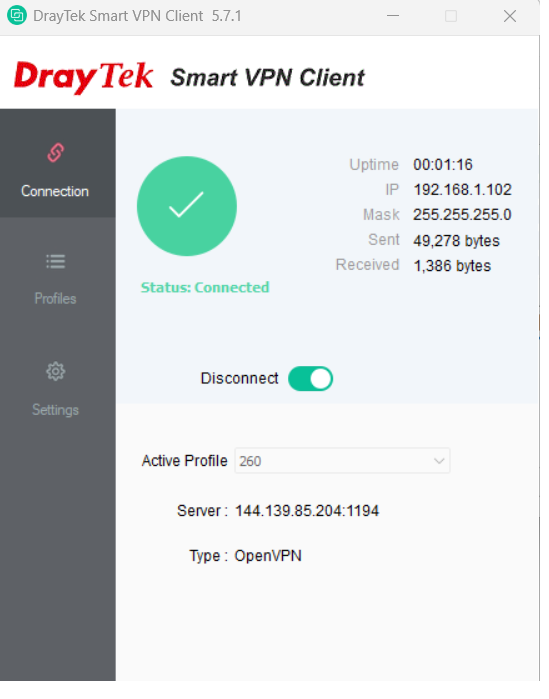
Step 6: Wait for VPN to connect until it is green
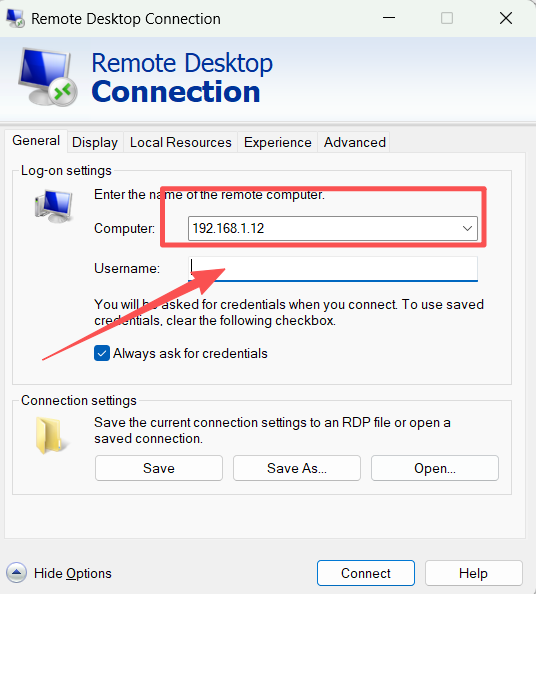
Step 7: Start the Remote Desktop program and input BP IP and windows user name
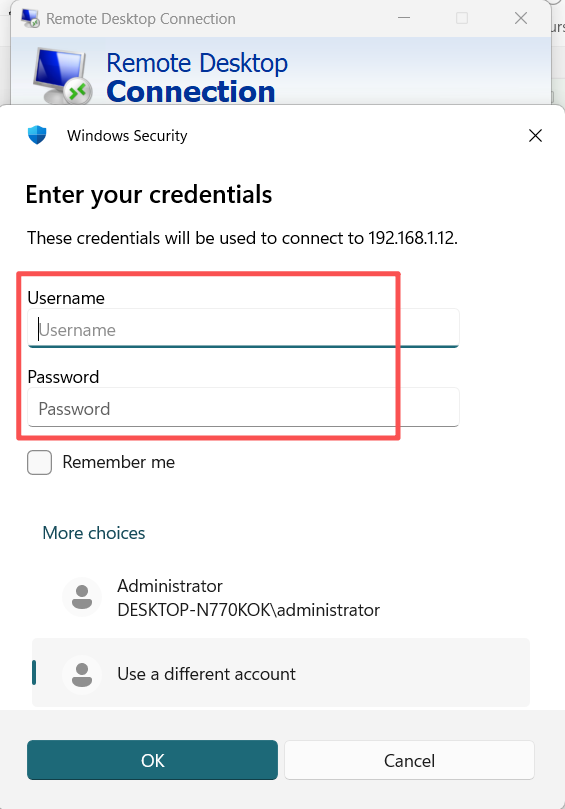
Step 8: Confirm the alert message, and the Remote Desktop Session will start.
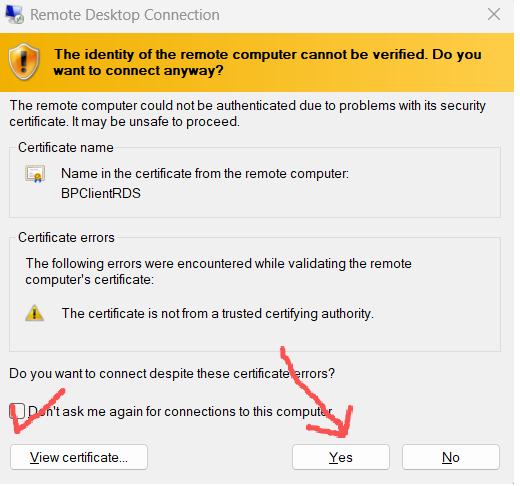
Table of Contents
 English
  Chinese